

DAX – Iterator functions
The Iterators functions operate in a row-level context. It iterates over each row of the table performing some sort of expression, allowing more complex calculations. The expression typically involves one or more other column values from the current row.
This is a list of the most common use Iterator Functions: SUMX, AVERAGEX, MAXX/MINXX, RANKX, COUNTX.
The expression contains:

In a sample dataset of book sales, we aim to calculate the total sales amount after applying discounts for each book author.
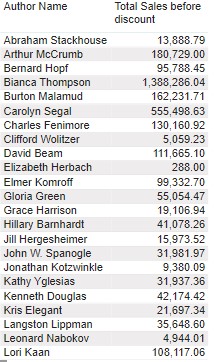
First, we will try to calculate using SUM. It shows an error because the SUM function only allow add values of one single column. It summarizes the values of the column across the entire table.

On the other hand, the SUMX will go through every single row of the input table and run the expression for that record.

<table> – Sales
<expression> – Sales[Sales Amt before Discount]* (1-Sales[Discount])
Result
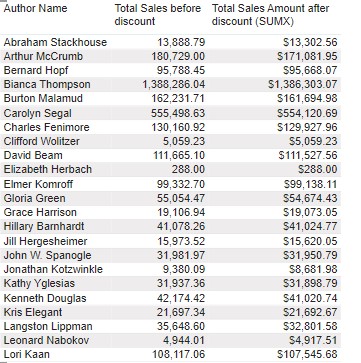
Adding another example, we will rank the Authors by Total Sales amount after discount using the Iterator Function RANKX.

<table> – Author[Author Name]
<expression> – Total Sales Amount after discount (SUMX)
The function ALL is use to return all the values from the author name column.
Result
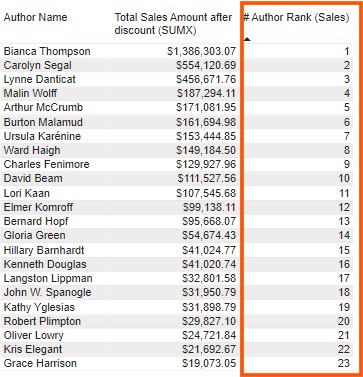
As a result, there is a Author’s rank by the Total Sales Amount after discount.
Access the Microsoft Training Module for more information about aggregations iterator functions.
I hope you enjoyed it. See you next time.

Author: Augusto Terra
Before joining the Data Schools, Augusto was a PE teacher and Football coach. A few years after enjoying working with data at his master's degree, Augusto decided this was the path that he was willing to pursue. This led him to join The Data School; he is keen to work with different data and find business solutions. He also enjoys being with his friends and playing sports (Football).